Guitar Learning Software: Free Interactive Guitar Tools and Games
Practice Chords, Scales, Rhythm and Your Ear in the Browser
FaChords guitar learning software is a collection of free interactive guitar tools and guitar games that run in your browser, with no download and no sign-up. Use the tools to look things up and practice with them: a chord finder, a scale finder, a chord progression generator, an interactive circle of fifths, a drum machine and more. Play the games to train your fretboard memory, your ear and your rhythm.
Every tool targets one skill and gives you immediate feedback: you see the notes on the fretboard, hear them played, and play along on your guitar. The games add a timer and a score, because a little pressure is what turns what you know into automatic recall. All of them work on computers, tablets and phones.
Pro Tip: Combine these games with the printable resources in your free download area to reinforce what you practice.
Fretboard Notes Game
Race the Clock to Master Every Note on the Neck

Knowing every note on the fretboard is a game-changer , literally. This fretboard trainer gives you a random note, sets a timer, and challenges you to tap the right fret before time runs out. The pressure is what makes it work: stress-tested recall becomes automatic recall.
Compete against other players, climb the Fretboard Trainer leaderboard, and watch your reaction time drop as the notes get locked into muscle memory. Short daily sessions beat long boring drills every time.
Fretboard Intervals Game
Train Your Fretboard Geometry Through Rapid-Fire Challenges

Think you know where the octave is? The fifth? The minor third? This fretboard interval game puts your geometric fretboard knowledge to the test with fast, focused drills across octaves, thirds, fifths, sevenths, and more.
The more you play, the more the neck stops feeling like a grid of dots and starts feeling like a map you know by heart , letting you build voicings on the fly from anywhere. Start in Training mode with one group of intervals and no timer, then play the 60-second game and climb the leaderboard.
Guitar Chord Finder
Name Any Chord You Play, Or Find Any Chord Shape

Found a shape by ear and have no idea what it is called? Click the frets you are playing in the guitar chord finder and it names the chord, with its notes and intervals. Or work the other way: pick a key and a chord type and see the shape on the neck.
It plays the chord in a loop with drums, takes a capo and alternate tunings, flips for left-handed players, and can even hear your guitar through the microphone.
Guitar Scale Finder
Any Scale, Any Key, On The Whole Fretboard

Pick a key and a scale and the scale finder draws it on the fretboard as a 4-fret box, 3 notes per string or the whole neck, with every note colored by scale degree so you always know where the root and the chord tones are.
Press play to hear it over a drum track, compare two scales on the same neck to see which notes change, and switch to alternate tunings or the left-handed view.
Chord Progression Generator
Build A Progression, Hear It, Jam Over It
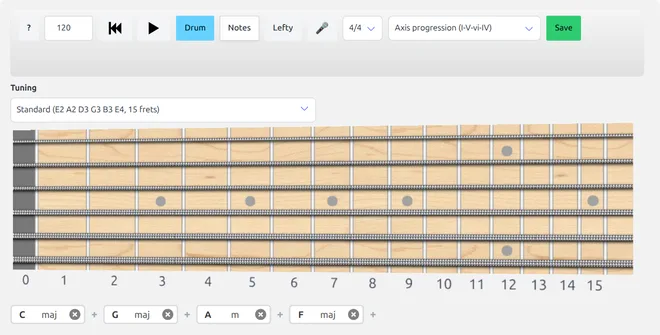
Start from a classic like I-V-vi-IV or build your own progression of up to 24 chords. The chord progression generator strums it over a drum groove in 3/4, 4/4, 5/4 or 7/8 and lights up every chord tone on the fretboard while it plays.
The next chord is previewed with outlines before the change arrives, which makes it a great backing track for improvising: aim your solo at the chord tones and move to the next chord smoothly.
Interactive Circle Of Fifths
See The Keys And Their Chords On The Guitar

Click a major or minor key on the interactive circle of fifths and see its scale on the fretboard and its seven chords with their Roman numerals, as triads or 7th chords.
Click a chord to hear it and see its notes on the neck, then step around the circle by fourths or fifths to hear how close keys share their chords.
Scales Over Chords
Which Scale Fits This Chord? See It On The Neck

Choose a chord and a scale and the scales over chords tool puts them on the same fretboard: the chord tones are solid notes, the other scale tones are smaller overlays, so you see at once which notes they share.
If every chord tone is in the scale, the scale fits. Try Mixolydian, Lydian dominant and superlocrian over the same 7th chord and hear the difference in your solos.
Guitar Modes Explorer
Finally Understand Modes , By Playing With Them

Modes confuse most guitarists when explained in words. They click instantly when you can see and hear them. This interactive explorer shows you the notes, structure, and diatonic chords for every mode , with live fretboard diagrams from major, harmonic minor, and melodic minor scales , so you can explore rather than study.
Click through the modes, hear the difference, see how the patterns shift. By the time you're done playing with it, you'll have an intuitive grasp of modes that no amount of reading could have given you as quickly.
Interval Ear Training Game
Train Your Ear Until You Hear Before You Play

This game plays two notes and asks: what's the interval? Simple premise, powerful result. Round after round of interval ear training directly on the fretboard builds the mental connection between sound and position until it becomes instinctive rather than calculated.
Players who stick with this game long enough report a shift: they start hearing a melody in their head and knowing exactly where to find it on the neck , without thinking. That's the goal, and it's absolutely achievable with consistent play.
Interval Invaders
An Ear Training Space Shooter , Aim by Sound, Not by Sight

In Interval Invaders the aliens are cloaked , you hear them before you see them. Every bar of the groove plays the root note, then the invader's tone: the distance between the two is the interval, and the interval is the lane. Move your ship and fire, or just tap the lane where the sound is coming from , even your lasers are pitched, so a miss tells you how far off your ear was.
Start on the pentatonic set and work your way up to the full chromatic scale across five levels, each in a different key so you train true relative pitch. Shoot an invader while it's still cloaked and you score a sonar kill , that's where the big points are, and where the real ear training happens.
Chords Recognition Game
Can You Name That Chord? Train Your Ear to Find Out

A chord plays. You listen. You guess. This chord recognition game is deceptively simple and genuinely addictive. Round by round, your ear learns to distinguish major from minor, diminished from dominant seventh, and over 20 chord types in total , purely by sound.
Start with "easy mode" to build a foundation on the most common chord types, then progressively unlock harder levels as your recognition sharpens. The game keeps score, so you can track exactly how much your ear has improved. Once your ear knows a chord type, my ebook Chords Domination shows how to build and play it, from open chords in every root to movable shapes for over 40 chord types.
Online Drum Machine
Build Unshakeable Rhythm by Playing Along

Nothing exposes weak rhythm faster , or builds strong rhythm more effectively , than playing with a real groove. This game lets you build drum tracks in any time signature and style, then play your guitar on top until it locks in tight.
Tweak the pattern, push the tempo, add accents , then challenge yourself to stay on the beat no matter what. The groove you build here is the groove you'll bring to your next jam session.
Strumming Lab
Master Any Strumming Pattern, One Loop at a Time

Strumming is the skill beginners struggle with most , and the one that's hardest to learn from a book. The Strumming Lab turns written patterns into something you can see, hear, and play along with: pick a genre preset (folk, pop, reggae, funk...), watch the down-up arrows light up in time, and loop it with real sampled guitar , not synth beeps.
Start slow, then let the tempo ramp push you a few BPM faster every loop. When the pattern feels solid, add the two-chord switch drill to practice changing chords without losing the groove , the classic drill that turns strumming from a struggle into a reflex.
Polyrhythms Machine
Feel Odd Meters and Polyrhythms as Groups of 2s and 3s
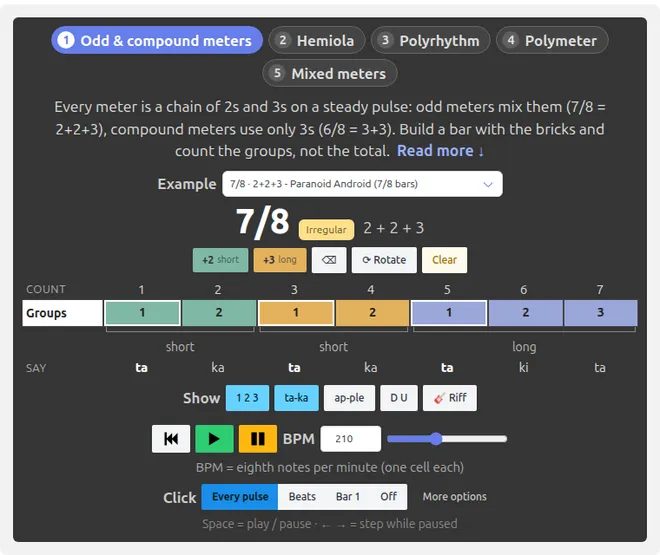
7/8, 11/8, 3 against 2: odd time signatures look scary until you see the trick behind them. The Polyrhythms Machine shows that every meter is just a chain of 2s and 3s over a steady pulse. Build a bar with +2 and +3 bricks, press play, and count along with ta-ka / ta-ki-ta while the cells light up in time.
Five tabs take you from odd and compound meters to hemiola (3/4 vs 6/8), polyrhythms on the LCM grid ("hot cup of tea"), polymeters like "Kashmir", and mixed meters like "Hey Ya!". When the groups feel natural, fade the metronome out step by step until you're keeping the pulse yourself.
Rhythm Dictation Game
Learn to Read Any Rhythm , With Words You Already Know

Say "Co-coa" and you've just clapped two eighth notes. Say "Wa-ter-mel-on" and that's four sixteenths. This rhythm dictation trainer uses that classic music-teaching trick , every common rhythmic figure gets a word you already know how to say , so reading rhythms stops feeling like math and starts feeling like talking.
Each card shows the real notation, plays the figure out loud, and highlights the syllables in sync. Toggle between the word view and classic ta / ti-ti syllables, set your tempo, add the metronome, and clap along until every figure is instantly recognizable , by eye and by ear.
Slow Downer and Song Looper
Slow Down Any Song, Loop the Hard Part, Learn It Note by Note

That solo is too fast to hear? The slow downer plays any audio file from 0.25x to full speed without changing the pitch, so you can pick out every note and play along at a tempo you can handle.
Set an A and B marker around the tricky bar, loop it until it feels easy, save your loops, and use the 10 band graphic equalizer to bring the guitar forward in the mix. Raise the speed step by step until you reach the original tempo.
Guitar Training Games , FAQ
Are the games really free?
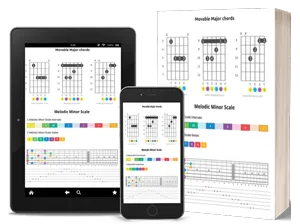
Yes , 100% free, no download or account required. Everything runs in your browser. To keep them free for everyone, I also offer comprehensive step-by-step ebooks on chords, scales, and progressions. Learn more here.
What device do I need?
Any device with a modern browser , desktop, laptop, or tablet. Chrome, Firefox, Safari, and Edge all work, on Windows, macOS, Linux, Android, and iOS. No installation, no plugins.
Pair the games with the complete reference ebooks to accelerate your progress even further.
Are alternate tunings supported?
Yes. Whether you play a 7 or 10 strings guitar, use alternate tunings, or play bass, mandolin, ukulele, or another stringed instrument , every game has a tuning and instrument selector.
Is there a left-handed mode?
Yes. Every game includes a flip setting for left-handed players. There are also dedicated left-handed chords and progressions ebooks if you're a lefty.
Pick a Game and Start Playing
These games started as internal practice tools for guitar students. The results were good enough that we decided to open them up to everyone , free, forever.
They're built by guitar players, for guitar players. We know what it feels like to grind the same scale pattern until it's boring, and we built these games specifically to solve that problem: make the repetition fun enough that you actually keep coming back.
Even a few minutes a day adds up fast. Pick one game, play it consistently for a week, and you'll feel the difference in your playing.
Have a game idea or feature request? Send a message here , we'd love to hear it.

Created by
Giancarlo is a musician (teaching guitar since 2000), software engineer, AI consultant and published researcher